

6E Club Game Register
Open an account in about two minutes

Opening a 6E Club Game account is quick — the form asks for a phone number, a password and a one-time code. The part people rush is what comes next: claiming the welcome rewards in the right order, setting a withdrawal password and linking a bank account in their own name. Get those right and your first withdrawal is painless.
Before You Start
- An Indian mobile number that can receive SMS.
- A password you haven’t used anywhere else.
- A bank account or UPI ID in your own name (needed later for withdrawals).
- You must be 18 or older, and real-money gaming must be allowed in your state.
6E Club Game Registration — Step by Step
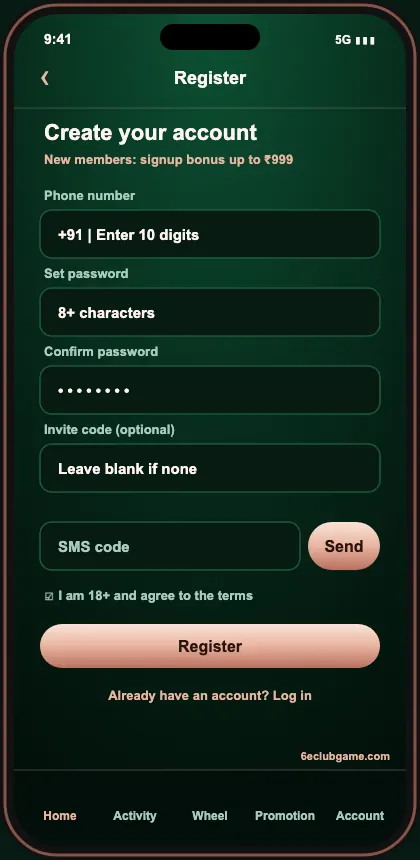
- Open the form: tap Register.
- Phone number: type ten digits.
- Password: eight or more characters, letters and numbers.
- Confirm password: type it again.
- Invite code: leave blank or paste a friend’s.
- SMS code: tap Send and enter the OTP.
- Agree: tick the box confirming you’re 18+ and accept the terms.
- Register: the lobby opens, already signed in.
Claim Your Welcome Rewards
Open the Activity tab right after registering. The registration reward — the first part of the ₹999 signup bonus — is usually ready immediately. Then redeem today’s code:
The larger parts of the welcome package unlock with your first recharge and a few starter tasks. Choose a first deposit that matches the budget you’d already decided on; a bigger bonus on money you didn’t plan to spend isn’t a good deal.
Five Minutes of Setup That Saves Hours Later
Withdrawal password
Account → Settings. Make it different from your login.
Bank or UPI
Must be in your own name, or payouts are rejected.
Install the app
Faster and keeps you away from copy sites.
Check login history
Know what ‘normal’ looks like on your account.
Notifications
Turn on reward reminders, mute promotions.
Read the bonus rules
Note the turnover on each reward.
Choosing a Password You’ll Remember
Three unrelated words and a number — something like tiger-window-mango-27 — is far easier to remember than a jumble of symbols and much harder to guess. Don’t use your phone number, birthday or anything you’ve used on another gaming site.
If 6E Club Game Registration Fails
| “Phone number already registered” | You already have an account — use the 6E Club Game login or reset |
|---|---|
| “Invalid invite code” | Clear the box; you don’t need one |
| OTP not arriving | Let the countdown finish, review DND, confirm the SIM slot |
| “Password format incorrect” | Use 8+ characters with letters and numbers |
| Form keeps reloading | Try the app or another browser |
Rules Worth Knowing on Day One
- One account per person — family members need their own.
- Bonus balance carries turnover before it can be withdrawn.
- The withdrawal account must match your name.
- Using a VPN can flag your account for review.
What to Do Next
Make a small first deposit through the deposit & withdrawal guide, then try WinGo on the 3-minute timer or Aviator with auto cash-out. Curious how everything fits together? The 6E Club Game homepage has the full tour.
Why Only One Account per Person
Bonuses are designed for new players, so the platform checks phone numbers, devices, bank details and UPI IDs to stop people opening several accounts to claim them repeatedly. Duplicate accounts are usually closed with their balances. If you lose access to an account, recover it — don’t open a new one.
Registering for Family Members
Every adult who wants to play needs their own account, their own phone number and their own bank account. Sharing one device between accounts can trigger checks, so each person should ideally use their own phone.
Your First Hour After Signing Up
| Time | Do this |
|---|---|
| 0–5 min | Claim registration reward, redeem gift code |
| 5–10 min | Set withdrawal password, link bank/UPI |
| 10–15 min | Install the app if you used the browser |
| 15–60 min | Small first deposit, a few slow WinGo rounds |
Will I Need to Verify My Identity?
Basic play only needs your phone number. Larger or unusual withdrawals may trigger extra checks, and support may ask you to confirm the bank account is yours. Having your account and UPI in your own name from day one avoids delays.
Checking Your State’s Rules
A few Indian states restrict online real-money games. Check the rules where you live before registering — the platform’s terms also ask you to confirm this.
Searching for a 6E Club new link or 6E Club latest link? Bookmark the 6E Club Game website once, or install the 6E Club Game app, and you’ll never need a search result again.
Frequently Asked Questions
Is 6E Club Game registration free?
Yes. There’s no fee, and new members can collect up to ₹999 in bonuses.
Do I need an invite code?
No. It’s optional; enter one only if a friend gave it to you.
Can I register with email?
No. Sign-up uses an Indian mobile number verified by SMS OTP.
Can I open two accounts?
No. One account per person, phone and bank account. Duplicates are closed.
What’s the minimum age?
18. Accounts for minors are closed when found.
Create Your 6E Club Game Account
Two minutes to sign up, five to set up properly — then collect your welcome bonus.