
6E Club Game App Download
Android APK in under a minute
Think of the 6E Club Game app as a faster doorway to the account you already have with a faster lobby, a remembered login and reminders for free spins and check-in rewards. Because it isn’t on the Play Store, Android users install an APK. That’s normal for gaming platforms, but it’s also why fake versions circulate. This guide shows the safe route.

| App name | 6E Club Game |
|---|---|
| File type | Android APK · iPhone web app |
| Size | About 30–60 MB |
| Android version | 8.0 or newer recommended |
| Price | Free |
| Permissions | Internet, optional notifications |
Installing the APK on Android
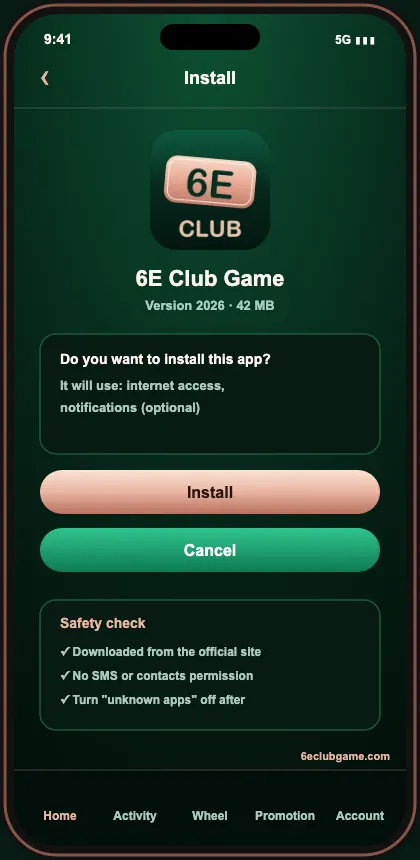
- Open the official site in Chrome and tap Download App.
- Chrome warns that APK files can be harmful — tap Download anyway.
- Open the file from the notification bar.
- When asked, allow Install unknown apps for Chrome only.
- Tap Install, then Open.
- Go back to Settings and switch the install permission off.
- Log in or register.
Adding 6E Club Game to an iPhone
- Open the official site in Safari (Chrome on iPhone can’t do this).
- Tap the Share icon at the bottom.
- Scroll and tap Add to Home Screen.
- Keep the name 6E Club Game and confirm.
- Open it from the fresh icon on your home screen.
App vs Browser
| App | Browser | |
|---|---|---|
| Stays logged in | Yes | Sometimes |
| Speed on mobile data | Faster | Good |
| Reward reminders | Yes | No |
| Risk of copy sites | None | If you search each time |
| Storage | 30–60 MB | None |
Permissions the Real App Needs
Network access, plus notifications if you choose to allow them — nothing else. If an app asks to read SMS, contacts or call logs, or wants Accessibility control of your screen, it’s not the genuine 6E Club Game app — it’s built to read your OTPs.
Install Errors and Fixes
| “App not installed” | Remove the previous copy, then install again |
|---|---|
| “Package appears to be invalid” | File got cut off mid-download; fetch it again over Wi-Fi |
| “Not enough storage” | Clear at least 200 MB of space |
| Play Protect warning | Tap More details → Install anyway (official file only) |
| App opens then closes | Clear the app’s cache, restart the phone, reinstall |
Keeping the App Updated
When a new version is ready, the app prompts you. If it doesn’t, download the latest file from the official site and install over the top. Updates fix bugs and sometimes add games, so it’s worth staying current.
Moving to a New Phone
Install the app on the new phone from the official site, sign in with the same number and approve the OTP. Delete the app from the old phone and log out of it first if you’re selling or giving it away.
After Installing: First Steps
- Log in or register.
- Redeem gift code
SGERIU37U393RHJF37YYHIROI3KHJR. - Claim the registration part of the ₹999 signup bonus.
- Try a slow game first — WinGo on 3 minutes.
Storage, Data and Battery
The app itself is light, but cached images grow over time. If it starts feeling slow, clear the app’s cache in Settings → Apps — your account and balance aren’t affected. Lottery games use very little data; live tables and animated slots use more, and they’re also the heaviest on battery.
How to Tell the APK Is Genuine
- You downloaded it from the official site, not a chat or video description.
- The install screen asks only for network access (and optional notifications).
- The login page looks exactly like the website’s.
- Your existing password works — a copy can’t log you in.
Uninstalling Safely
Log out first, then uninstall from Settings → Apps. Your account stays on the server, so you can reinstall any time and sign in again.
Older Android Phones
On very old Android versions the APK may fail to install with a parse error. In that case use the browser version — it has the same games and wallet.
Quick Answers
| Does the app need root? | No. |
|---|---|
| Does it run in the background? | Only for notifications if you allow them. |
| Can I install on two phones? | Yes, but only one session stays active. |
Ask regular players why they stayed with 6E Club Game and you’ll hear the same answers: the 6E Club Game login just works, a 6E Club deposit lands fast, and 6E Club rewards are easy to find.
Frequently Asked Questions
Is the 6E Club Game app free?
Yes, completely free, and it uses your normal login.
Why does Android warn me about the APK?
Any app from outside the Play Store triggers that warning. Stick to the official download and disable the permission once installed.
Is there an iPhone app?
On iPhone, Safari can pin the web app to your home screen, where it opens like any other app.
How do I update the app?
Accept the in-app update prompt, or download the latest file and install it over the old one.
Will reinstalling delete my balance?
No. Your account lives on the server.
Get the 6E Club Game App
Download only from the official site — and delete anything that calls itself a mod.